Claude Code pulls configuration from a lot of places at once: a user-level home directory, a project directory, plugins, and — if you’re on a managed machine — an organization policy layer above all of it. Once you’re running more than one or two projects, it stops being obvious what’s actually in context for a given session, and that matters in two directions. Too much loaded and you’re paying token cost for instructions and skill descriptions a session will never use. Too little loaded and a rule you were relying on silently isn’t there.
This post is a reference for how that loading actually works: what scopes exist, which files back them, and — the part that trips people up — that “hierarchy” doesn’t mean the same thing in every layer. Some layers override each other. Some concatenate. Some run everything at once and let the strictest answer win. Knowing which model you’re in tells you where to put a given piece of configuration.
The four things that load
| Mechanism | Personal/user scope | Project scope | Org-wide scope |
|---|---|---|---|
| CLAUDE.md (persistent instructions) | ~/.claude/CLAUDE.md | ./CLAUDE.md or ./.claude/CLAUDE.md, plus ./CLAUDE.local.md | Managed policy CLAUDE.md (path varies by OS) |
| Skills | ~/.claude/skills/<name>/SKILL.md | .claude/skills/<name>/SKILL.md | Managed settings |
| Plugins (bundle skills, hooks, MCP servers, subagents) | Enabled via ~/.claude/settings.json → enabledPlugins | Enabled via .claude/settings.json → enabledPlugins | Deployed via managed configuration |
| Settings / permissions / hooks | ~/.claude/settings.json | .claude/settings.json (shared) and .claude/settings.local.json (gitignored) | Managed policy settings |
Two of these are worth naming even though they’re not the main topic here: auto memory (notes Claude writes about you and the project as you work, stored under ~/.claude/projects/<project>/memory/ and loaded automatically each session) and .claude/rules/ (a way to split a growing CLAUDE.md into topic files, optionally scoped to file paths so a rule only loads when Claude touches matching files). Both ride the same scope system described below.
Not all hierarchies work the same way
This is the part that’s easy to get wrong by analogy. “Higher scope wins” is true for some of these mechanisms and false for others.
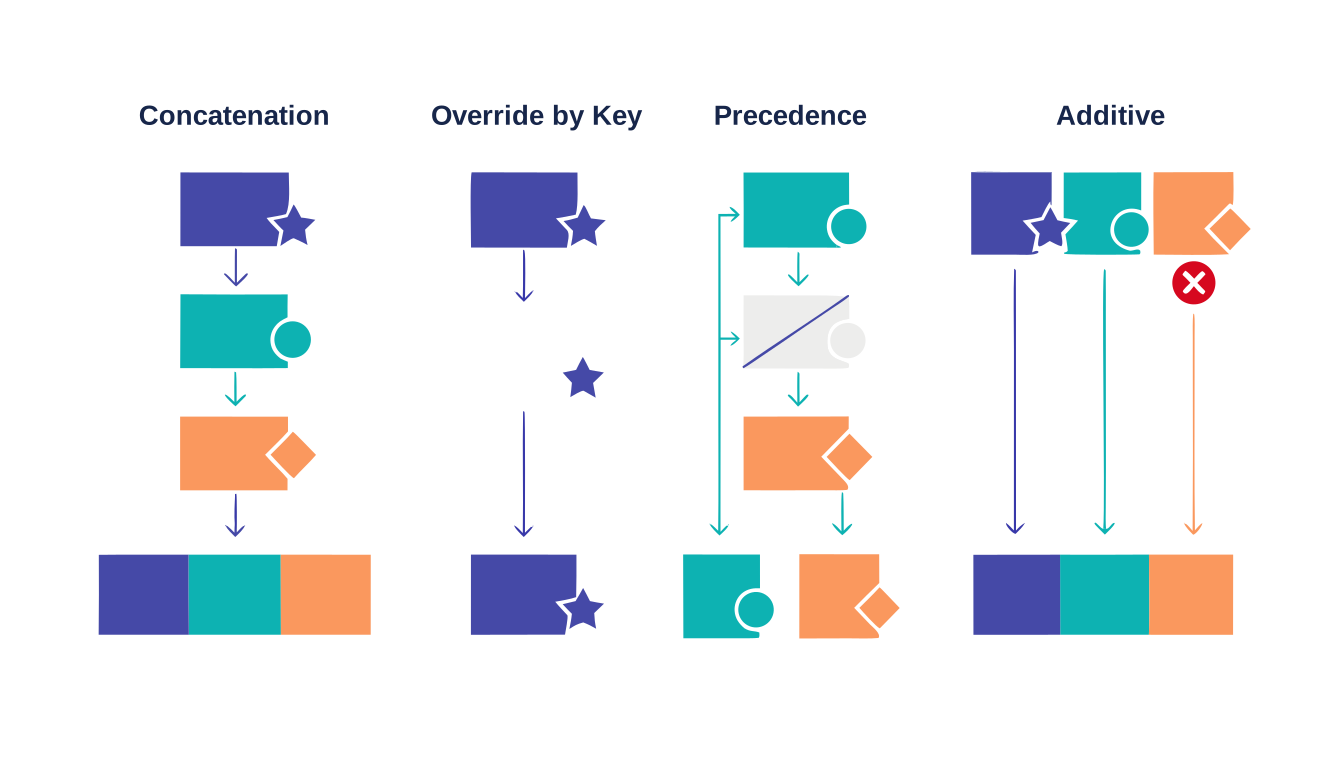
- CLAUDE.md is concatenation, not override. Every applicable file gets appended into context, ordered broadest to narrowest — an org policy file, then your user file, then the project file, then a local file — so a project instruction is the last thing Claude reads, not a replacement for what came before. Nothing here is discarded; if two files disagree, Claude just has to reconcile conflicting instructions, which is a different failure mode than “the wrong one silently won.”
- Settings.json values are override-by-key. A boolean or string set in a higher-precedence file replaces the same key set in a lower one. Only one value survives per key.
- Skills resolve name collisions by strict precedence, but everything without a name collision stays available side by side — it’s closer to a namespaced override than a full override.
- MCP servers resolve duplicates by precedence too, matched by server name (or by endpoint for plugin/connector servers), with only the highest-precedence definition connecting.
- Hooks are additive. Every hook matching an event across every scope runs — none of them “win” by being more specific. The only override-like behavior is that a deny from any single hook blocks the action even if every other hook allowed it.
Worth sitting with that distinction before deciding where to put something: a CLAUDE.md instruction is a suggestion competing with other suggestions for Claude’s attention; a hook is a shell command that runs regardless of what Claude decides.
CLAUDE.md: the full hierarchy
| Scope | Location | Shared with |
|---|---|---|
| Managed policy | macOS: /Library/Application Support/ClaudeCode/CLAUDE.md · Linux/WSL: /etc/claude-code/CLAUDE.md · Windows: C:\Program Files\ClaudeCode\CLAUDE.md | Everyone on the machine, in every repo |
| User | ~/.claude/CLAUDE.md | Just you, all projects |
| Project | ./CLAUDE.md or ./.claude/CLAUDE.md | Team, via version control |
| Local | ./CLAUDE.local.md (gitignored) | Just you, this project |
A managed policy file can’t be excluded by individual settings — it’s how an organization enforces coding standards or compliance requirements across every developer machine, typically deployed via MDM or a config management tool. It’s also possible to inline managed CLAUDE.md content directly into a managed-settings.json file via a claudeMd key, without a separate file at all.
Load order matters here specifically because it’s concatenation: Claude Code walks from the filesystem root down to your working directory, so a file further up loads first and a file closer to where you launched loads last. CLAUDE.local.md is appended right after its sibling CLAUDE.md at each level, so your personal notes are the final thing Claude reads at that level. Files in directories below your working directory aren’t loaded at launch — they load on demand, the first time Claude reads or edits a file in that subdirectory. That’s what makes a monorepo pattern like a package-specific CLAUDE.md under packages/frontend/ work without bloating every session that never touches frontend code.
One practical constraint: keep each file under roughly 200 lines. Longer files consume more context and Claude Code’s own guidance is that adherence drops as files grow — which is exactly the argument for pushing procedural, multi-step content into a skill instead of a CLAUDE.md paragraph.
Settings.json: five levels, override by key
| Precedence | Source | Who controls it |
|---|---|---|
| 1 (highest) | Managed settings — managed-settings.json, MDM, or an admin console | Your organization |
| 2 | Command line — claude --settings | You, this invocation |
| 3 | Project local — .claude/settings.local.json | You, this project (gitignored) |
| 4 | Shared project — .claude/settings.json | Everyone on the project (committed) |
| 5 (lowest) | User — ~/.claude/settings.json | You, every project |
This governs permissions, environment variables, statusline config, and — importantly — which plugins are enabled. If the same key is set at two levels, the higher-precedence value wins outright; there’s no merge.
Skills: two-stage loading is the mechanic worth understanding
This is the piece that actually answers the “how do I avoid bloating context” question. Skills don’t load in one shot.
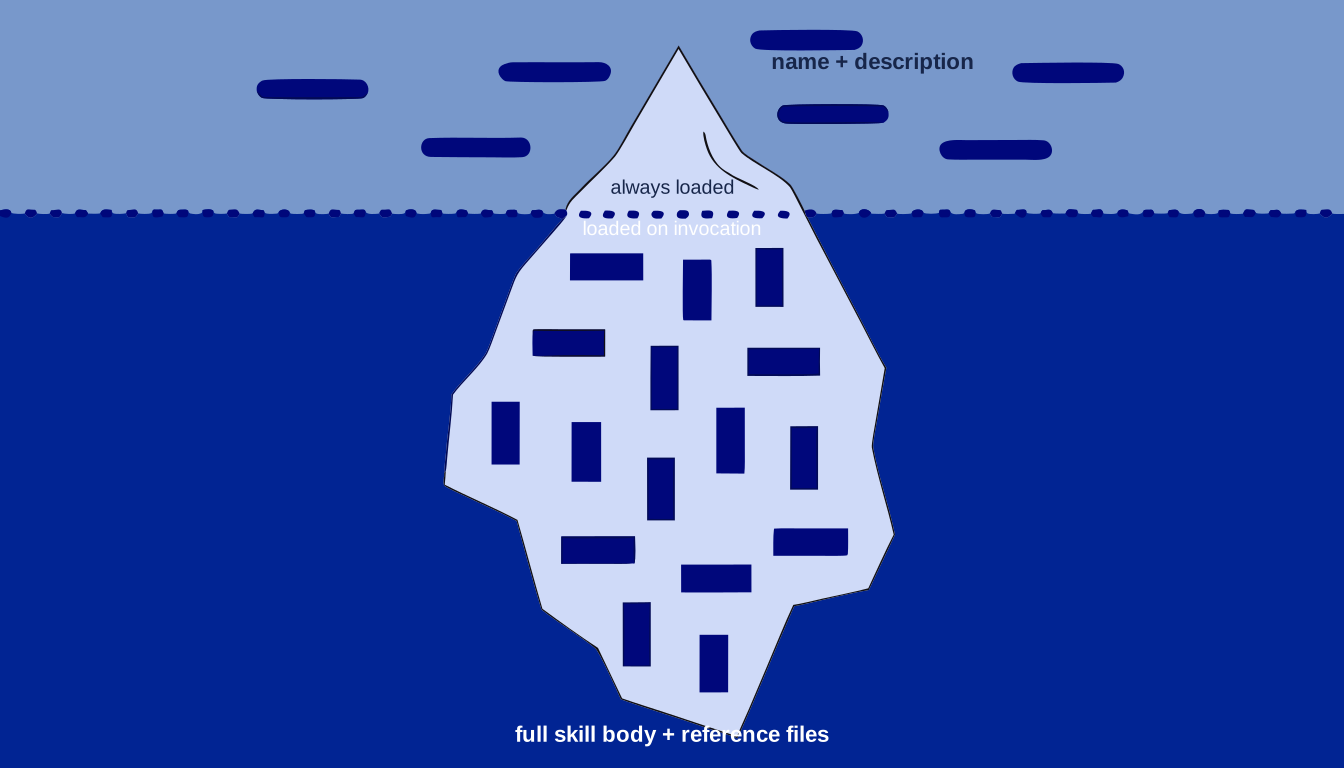
Stage 1, always: only each skill’s name and description frontmatter gets listed in the system prompt, for every skill Claude Code can see across personal, project, and enabled-plugin sources. That’s a line or two of text per skill — cheap regardless of how many skills exist.
Stage 2, on demand: the full skill body, and any bundled reference files, load only when the skill is actually invoked — either you type /skill-name or Claude judges the description matches your request. An unused skill costs roughly one sentence of context, not its contents.
Where skills live and how conflicts resolve:
| Level | Location | Scope |
|---|---|---|
| Enterprise | Set via managed settings | All users in the org |
| Personal | ~/.claude/skills/<name>/SKILL.md | All your projects |
| Project | .claude/skills/<name>/SKILL.md | This project |
| Plugin | <plugin>/skills/<name>/SKILL.md | Wherever the plugin is enabled |
When two skills share a name, enterprise overrides personal, and personal overrides project — so a personal skill quietly shadows a same-named project skill unless you know to look for it. Plugin skills are namespaced (plugin-name:skill-name), so they never collide with anything else.
Project skills aren’t limited to your exact working directory: Claude Code loads .claude/skills/ from the directory you started in and every parent directory up to the repository root, so starting a session in a subdirectory still picks up skills defined at the project root. Going the other direction, skills in a subdirectory below where you started aren’t loaded at launch — like CLAUDE.md, they activate the first time Claude touches a file in that subdirectory, and they appear under a directory-qualified name (packages/frontend:deploy) if the name collides with something already loaded.
Plugins: bundles, enabled per scope
A plugin packages skills, slash commands, subagents, hooks, and MCP servers together, installed from a marketplace and turned on via an enabledPlugins key. That key can live in user settings (global — active in every project regardless of working directory) or in a project’s own .claude/settings.json (scoped to that project, and shareable with a team via version control). Everything the plugin bundles follows the same two-stage skill-loading rule above: enabling a large plugin adds a handful of description lines to every session’s context, not the plugin’s full instruction set.
MCP servers: a five-way precedence list
MCP (Model Context Protocol) servers connect Claude Code to external tools and data — issue trackers, databases, internal APIs. They’re configured at three primary scopes:
| Scope | Loads in | Shared with team | Stored in |
|---|---|---|---|
| Local | Current project only | No | ~/.claude.json |
| Project | Current project only | Yes, via .mcp.json in the repo | .mcp.json |
| User | All your projects | No | ~/.claude.json |
Organizations can add a fourth, managed layer on top via enterprise configuration. When the same server name is defined in more than one place, Claude Code connects once, using the definition from the highest-precedence source — fields aren’t merged across scopes, the whole entry from the winning source is used:
- Local scope
- Project scope
- User scope
- Plugin-provided servers
- claude.ai connectors
Local, project, and user scopes are matched by server name; plugin and connector servers are matched by endpoint instead, so a plugin server pointed at the same URL as one you already configured is treated as the same duplicate even with a different name.
Hooks: the one mechanism that isn’t precedence at all
Hooks are shell commands Claude Code runs at fixed lifecycle events — before a tool call, after a file edit, on session start — and they’re deterministic: they run regardless of what Claude decides to do, which is exactly why they’re the right tool for anything that must happen every time rather than when Claude judges it should.
| Location | Scope | Shareable |
|---|---|---|
~/.claude/settings.json | All your projects | No |
.claude/settings.json | This project | Yes, committed |
.claude/settings.local.json | This project | No, gitignored |
| Managed policy settings | Org-wide | Yes, admin-controlled |
Plugin hooks/hooks.json | While the plugin is enabled | Yes, bundled |
| Skill or subagent frontmatter | While that skill/subagent is active | Yes |
Unlike every other mechanism above, hooks don’t pick a winner — every hook matching a given event, across every scope, runs in parallel. If a logging hook exits 0 (no opinion) and a guardrail hook exits 2 (deny) on the same event, the action is blocked, but the logging hook still ran and wrote its log entry first. The only way to turn hooks off is disableAllHooks, which follows the same settings precedence as everything else in settings.json — except a disableAllHooks set in managed policy always applies, regardless of what a project or user file says.
A worked example
Picture two projects: project-a, a client engagement with its own tooling, and project-b, an unrelated personal project. Starting a session inside project-a:
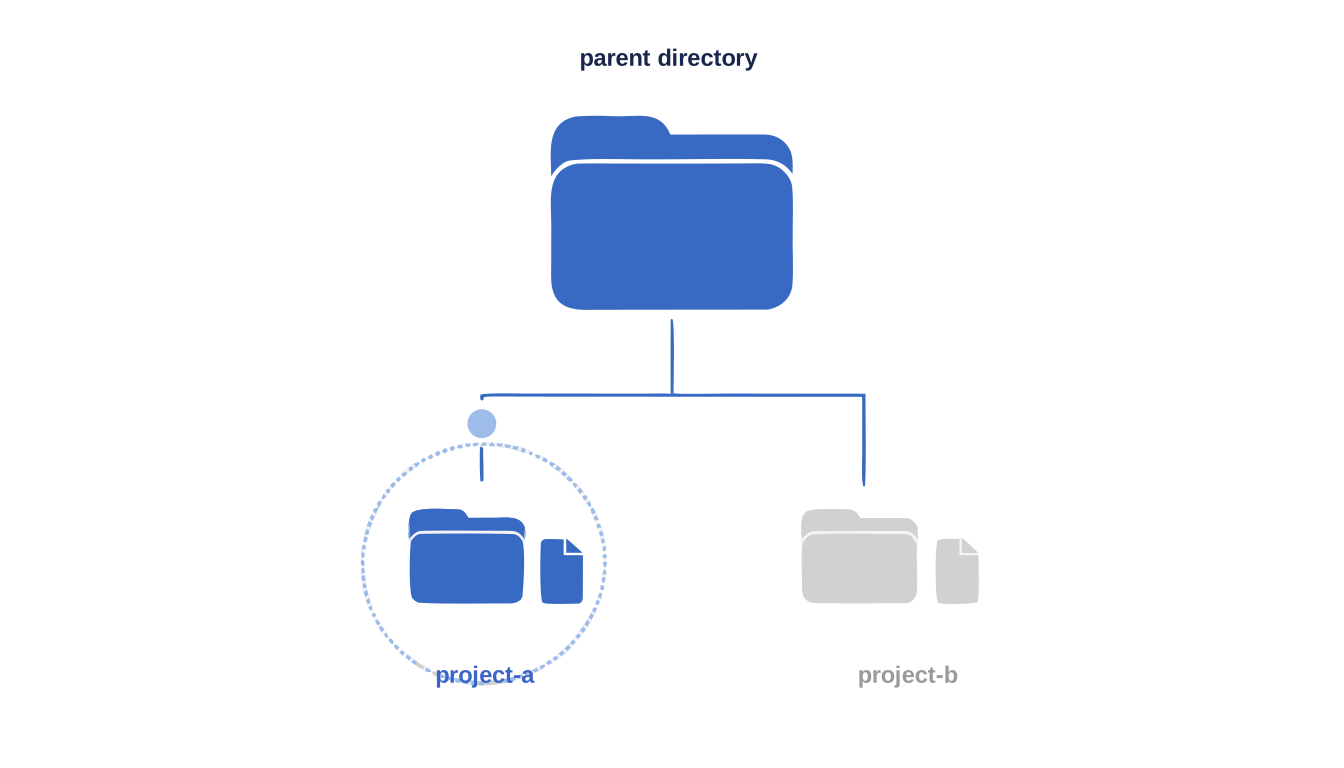
- CLAUDE.md: your user file loads, concatenated with
project-a/CLAUDE.md— client context, engagement specifics, whatever you’ve written there - Skills: every personal skill, every skill from an enabled plugin, plus anything in
project-a/.claude/skills/— none of which are visible fromproject-b - Settings: your user settings merged (by key) with
project-a/.claude/settings.jsonand.local.json - MCP servers: any user-scope server, plus anything
project-adefines in its own.mcp.json
Start instead from the parent directory containing both projects, with no CLAUDE.md at that level: your user CLAUDE.md still loads, but no project memory does, and neither project’s .claude/skills/ or .mcp.json is visible, since none of them sit at or above the directory you launched from.
Placing things on purpose
- Standing, cross-project preferences → user CLAUDE.md. Every session pays this cost, so keep it tight.
- Facts specific to one engagement or codebase → project CLAUDE.md. Only loads when you’re there.
- A workflow you’d reuse across every project → personal skill. The unused cost is one description line.
- A workflow tied to one project’s specific stack → project skill, so its description doesn’t show up in sessions that will never use it.
- Something that must happen every time, not just when Claude decides to → a hook, not a CLAUDE.md instruction. CLAUDE.md content is a strong suggestion; a hook is enforcement.
- A plugin genuinely used everywhere → enable globally. A plugin tied to one project’s stack → enable it in that project’s settings instead of globally.
None of this requires getting it perfect on day one. The cost of getting a scope wrong is almost always small and reversible — move a file, and the next session loads differently. The point of understanding the mechanism isn’t to optimize prematurely; it’s to know, when a session behaves unexpectedly, which of these five systems to go check first.